

"Black Friday" Price Guarantee 🔒
--
Days--
Hours--
Mins--
SecsA programmable electric skateboard is usually not programmed like a computer or an open-source controller. In most cases, riders select predefined ride modes, change supported remote settings, monitor information through an app, or configure hardware parameters during pairing. Knowing the difference helps you customize the board without changing settings that should remain factory-controlled.
“Programmable” is used loosely in electric skateboard marketing. It can refer to several levels of control, from selecting a ride mode to changing technical controller parameters. These functions should not be treated as interchangeable.
|
Control level |
Typical function |
Intended user |
|
Ride modes |
Select a predefined speed or response profile |
Every rider |
|
Riding controls |
Accelerate, brake, change direction and operate lights |
Every rider |
|
Display preferences |
Select units or view ride information |
Every rider |
|
App controls |
Monitor data and access supported settings |
Model-dependent |
|
Pairing parameters |
Configure voltage, drivetrain or wheel information |
Replacement setup and servicing |
|
ESC tuning |
Change internal power or braking parameters |
Only when officially supported |
Most consumer boards are configurable rather than freely programmable. Their manufacturer defines the main acceleration, braking, current, voltage, and thermal-protection limits. The rider chooses among the controls intentionally exposed through the remote or app.
This approach makes everyday operation simpler and reduces the chance of an incompatible setting affecting motor response. Riders comparing electric skateboards should still check the exact model and controller because two app-connected boards may offer different adjustment options.
Electric skateboard ride modes provide predefined ways to manage the board’s available performance. They are useful for learning, crowded routes, relaxed cruising and more open riding environments, but their names and behavior are not standardized across brands.

A lower mode may soften acceleration, limit maximum speed or change both. A higher mode may provide stronger acceleration and access to more of the board’s speed range. The number of modes alone does not reveal how each one behaves, and riders should not assume that changing the speed mode also changes braking strength.
Start with the lowest appropriate mode in a flat, dry and traffic-free area. Practice gentle starts, progressive braking and controlled turns before moving upward. A lower mode can make the initial response more manageable, but it does not prevent falls or compensate for poor road conditions.
Changing modes should normally be done with the throttle returned to neutral and according to the instructions for the exact remote. MAXFIND’s current four-speed remote instructions, for example, state that the gear switch operates when the control roller is in its central position. This helps prevent an unintended mode change during active acceleration.
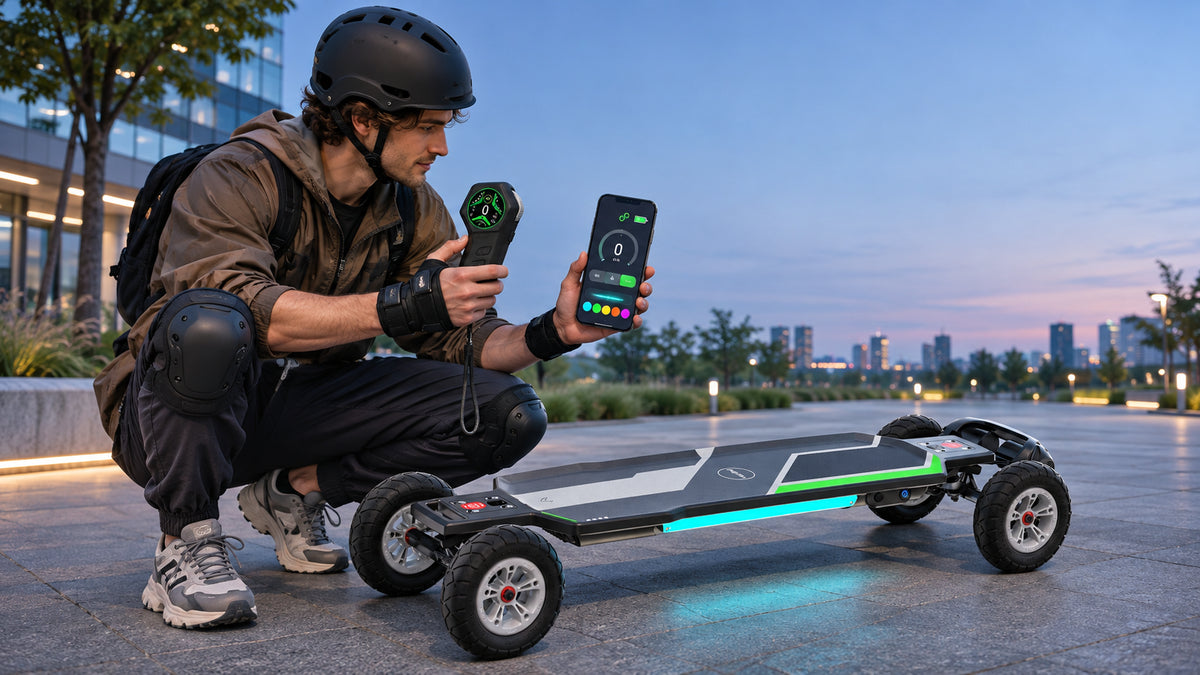
The remote remains the primary riding control even when an electric skateboard app is available. It provides immediate access to acceleration and braking and may also manage ride modes, direction, lighting and displayed information.
The current MAXFIND four-speed remote uses a thumb roller for acceleration and electronic braking. Its documented functions include switching gears, changing direction at very low speed, controlling compatible ambient lighting and displaying board information. Exact controls vary across remote generations, so owners should follow the manual supplied with their board instead of applying one procedure to every MAXFIND model.
A rider may also encounter selectable display units or hardware information while pairing a replacement remote. These settings can include:
Kilometers per hour or miles per hour
Hub or belt drivetrain
System voltage
Wheel diameter
Drive ratio
Motor pole-pair value
Compatible ESC or board type
These are primarily calibration and compatibility parameters, not performance upgrades. Wheel diameter, drive ratio and motor information help the controller calculate values such as speed and distance. Entering incorrect data may produce inaccurate readings or abnormal system behavior.
Some model-specific remotes provide additional functions. The MAXFIND IMPULSE LED Remote, for example, is documented for the CYBER ULTRA and includes a color display, ride information, gear switching, cruise control, parameter setup and compatible ambient-light controls.

That does not make the remote universally compatible with every electric skateboard. A controller may resemble the original remote and still use different firmware, voltage settings or communication protocols. Before replacing or upgrading a remote, confirm the exact board model, variant, drivetrain, ESC and required pairing parameters.
Cruise control also requires particular care. It can maintain movement without continuous throttle input, so riders should learn how the function activates and cancels before using it. It should not be tested near traffic, pedestrians, steep descents or unpredictable surfaces.
An electric skateboard app can make information and supported adjustments easier to access, but app connectivity does not guarantee a complete set of tuning functions. Available controls may differ by board, firmware, controller and app version.
Current MAXFIND CYBER MINI, CYBER MAX and CYBER ULTRA specifications list Tuya smart-app support. However, the presence of the same app name does not establish that every model exposes identical controls. Buyers should check the connection guide for the selected configuration and avoid assuming that a feature shown for one board will appear on another.
Depending on the supported system, app functions may include:
Viewing speed and battery information
Checking estimated distance or ride status
Operating compatible ambient lighting
Activating a supported electronic lock or unlock function
Selecting available settings or ride preferences
Recording or displaying ride information
The current CYBER Electric Skateboard Conversion Kit page specifically describes Tuya Ride functions that include a custom unlock switch, real-time speed, battery and range information, and supported performance adjustments. Those published functions apply to that product and should not automatically be attributed to every MAXFIND board.
A phone should not replace the handheld remote while riding. Touchscreens are difficult to operate without looking away from the road, and a phone connection may be affected by battery level, permissions or wireless communication. Set up the app before moving, store the phone securely and use the compatible remote for acceleration and braking.
The electronic speed controller manages motor output in response to the remote. It also plays a central role in acceleration, electronic braking, voltage protection and system behavior. For that reason, electric skateboard ESC settings require more caution than changing a ride mode.
MAXFIND’s current CYBER MINI and CYBER MAX specifications list HOBBYWING V6.0 FOC control, while the CYBER ULTRA lists HOBBYWING V7.0 FOC control. FOC, or field-oriented control, describes how the controller regulates the motor. It does not by itself confirm that riders can freely rewrite acceleration curves, braking force, current limits or firmware.
Selecting the correct wheel diameter, drivetrain, voltage or motor information during remote pairing configures the system to match its hardware. It does not necessarily change the underlying ESC power map. Likewise, choosing a higher ride mode accesses a manufacturer-defined profile rather than creating a new one.
Unless official documentation clearly supports user adjustment, do not attempt to change:
Battery voltage limits
Motor-current limits
Battery-current limits
Temperature protections
Regenerative-braking limits
Acceleration or braking curves
Firmware from another controller or model
An aggressive or incompatible setting can affect heat, traction, battery load and braking behavior. Even when a technical menu is accessible, that does not mean every value is intended for routine experimentation.

Rolling the remote backward varies braking input during a ride. This is different from changing an independent brake-strength setting. Some systems may offer separate brake adjustment, while others link braking behavior to firmware or a predefined mode.
Do not assume that an app connection, a programmable remote or several ride modes confirms independent brake tuning. If this feature matters, ask the manufacturer about the exact model, controller, firmware and remote. Test any documented adjustment at walking speed on a flat, open surface before returning to normal riding.
Customization should make the board better suited to the rider and route without creating uncertainty about how it will respond. Make one supported change at a time and test it before changing anything else.
Record the original configuration. Photograph or write down the initial mode, units, voltage, drivetrain, wheel diameter and other visible parameters.
Confirm the exact hardware. Check the board model, selected variant, motor type, battery voltage, wheel size and remote version.
Use official instructions. Pairing procedures and button combinations can differ even between controllers from the same brand.
Keep the board stationary during setup. Position powered wheels so they cannot contact the floor, clothing, cables or tools.
Test in stages. Check direction, display values and motor response while stationary, then test at walking speed in a dry, open area.
Change one setting at a time. This makes it easier to identify the cause if the board behaves differently.
Stop when behavior is abnormal. Delayed response, incorrect direction, unrealistic speed readings, connection loss or unexpected braking require inspection before further riding.
Settings related to replacement wheels require particular attention. A different wheel diameter can change ground clearance, acceleration, braking feel and calculated speed. Belt-drive boards may also require the correct pulley ratio. Updating the display value alone does not ensure that the new hardware is mechanically or electrically suitable.
The most valuable controls depend on how the board is used. More settings are not automatically better.
A beginner benefits most from a clearly identified low mode, predictable throttle control and an easy-to-read connection and battery display. A commuter may value unit selection, lighting controls and quick access to battery information. A rider changing wheels may need accurate diameter and drivetrain parameters, while a CYBER ULTRA owner may appreciate the model-specific lighting and ride information available through the IMPULSE remote.
Advanced ESC tuning is less important for most owners than reliable controls and correct configuration. A board with fewer documented settings may be a better choice than one with extensive menus but unclear compatibility or instructions.
A programmable electric skateboard normally offers controlled customization rather than unrestricted programming. Ride modes, remote functions, app information and pairing parameters can make the board easier to use, but each feature is model-dependent. Change only documented settings, preserve the original configuration and test every adjustment carefully before riding normally.
Some boards support app-based monitoring and selected adjustments, but the available functions depend on the model, controller, firmware and app version. App connectivity does not guarantee access to internal ESC tuning.
Not necessarily. A mode may affect acceleration, maximum speed or both, while braking may be managed separately. Check the documentation for the exact board rather than assuming that low mode automatically provides weaker or gentler braking.
No. The remote must be compatible with the board’s ESC, voltage, drivetrain, firmware and communication system. A controller that pairs partially may still display incorrect information or produce unsafe motor behavior.
Only if the manufacturer explicitly provides and supports that adjustment for the exact hardware. Increasing power or changing protection limits without verified instructions can affect battery load, motor temperature, traction and braking reliability.
More reading: Electric Skateboard Remote: Pairing and Replacement Guide

Share:
How to Reduce Pavement Vibration on an Electric Skateboard Commute
The 2026 Holiday Gift Guide: Electric Skateboards & Gifts for Riders