

Schulanfangsangebot! 🏷️ Tolles Preis-Leistungs-Verhältnis!
--
Tage--
Öffnungszeiten--
Minuten--
Sek.An electric skateboard remote is the rider’s direct connection to acceleration and braking, so compatibility matters far more than appearance. Whether your controller will not pair, has been lost, or needs replacing, this guide explains what to check before buying, how pairing works, and how to test the connection safely before your next ride.
The remote sends commands to the electronic speed controller, or ESC, which determines how the motors accelerate, slow down, and respond to different riding modes. Understanding this relationship helps explain why a replacement must match the board’s electronic system.

Most electric skateboard remotes use a thumb wheel or roller. Pushing it forward commands acceleration, while pulling it backward applies electronic braking. The remote does not steer the skateboard; the rider turns by shifting body weight and leaning against the trucks. Depending on the control system, a separate button may change the riding mode or direction, but these adjustments should be made only according to the manufacturer’s instructions. Small thumb movements can cause noticeable speed changes in faster modes, so beginners should practice acceleration and braking in the lowest mode on flat, open ground.
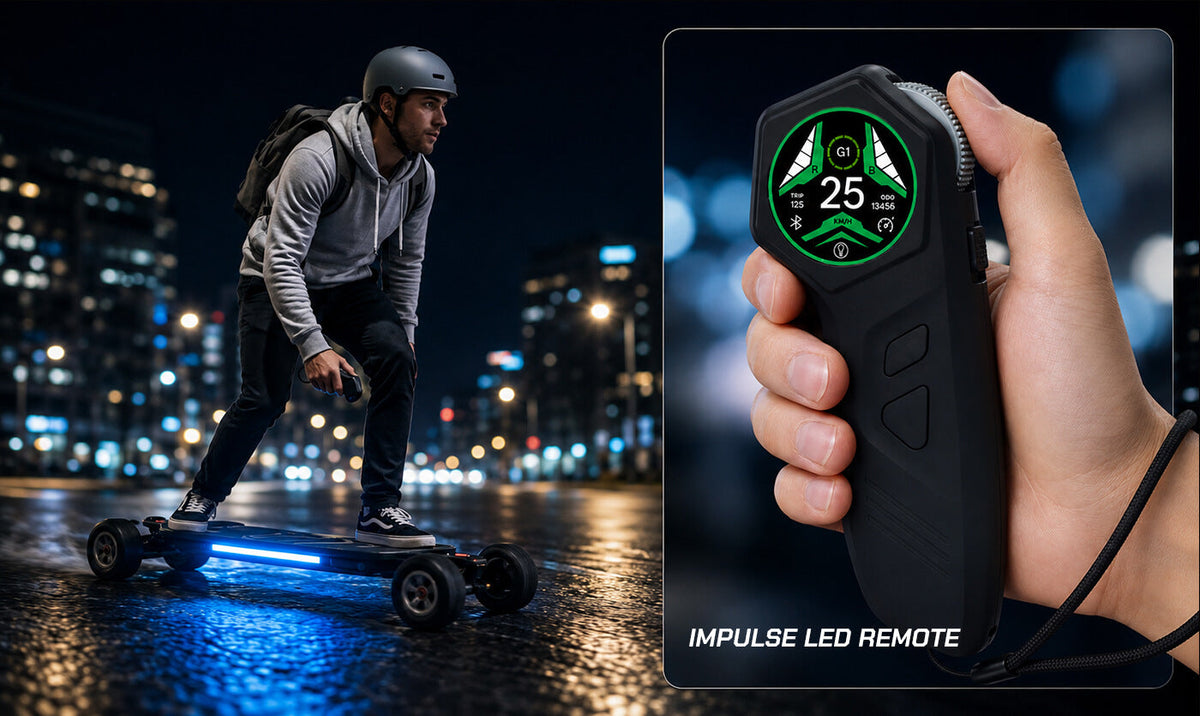
A remote display may show speed, board battery, remote battery, riding mode, direction, and connection status. Some controllers also operate board lighting, cruise control, or other model-specific functions. These features depend on the remote, ESC, firmware, and board configuration, so they should not be assumed to work across different models. A replacement may connect and operate the motors while displaying incorrect speed or failing to support lighting and battery information, which means successful pairing alone does not prove complete compatibility.
Remote compatibility depends on the complete control system rather than the shape, screen, speed-mode count, or advertised wireless frequency of the controller. The board model and its installed components must be identified before a replacement can be selected safely.
The ESC receives the remote’s wireless commands and converts them into motor behavior, so both devices must use a compatible communication protocol. Two remotes may look nearly identical while using different firmware, signal formats, or pairing procedures. A remote advertised as universal should not be considered compatible unless its manufacturer explicitly identifies the board or ESC. Even if an unsupported remote appears to connect, acceleration, braking, direction, battery reporting, or secondary functions may not behave as intended.
MAXFIND’s current programmable replacement-remote instructions require model-specific selections such as ESC type, 10S or 12S voltage, hub or belt drive, wheel diameter, drive ratio, motor pole pairs, and speed units. These are hardware parameters rather than personal riding preferences. Simpler or original-style remotes may use a different pairing process without the same parameter menu.
Incorrect values can produce inaccurate speed or distance information and may prevent the remote from matching the board’s configuration. Belt-drive owners may need the ratio between the motor pulley and wheel pulley, while hub-drive owners need accurate wheel and motor information. If the required settings cannot be confirmed, contact the manufacturer instead of trying different combinations until the board appears to respond.
Record the complete board model and variant instead of relying only on the family name printed on the deck. One product family may contain hub-drive and belt-drive variants with different batteries, motors, wheels, or ESC generations. Check the original order confirmation, user manual, serial information, battery label, enclosure label, and official specification page. If wheels, pulleys, motors, batteries, or control components have been replaced, record the current setup because the original factory specifications may no longer describe the board accurately.
A suitable replacement should match the board’s control system and preserve the functions the rider needs. Verified compatibility is more important than price, screen design, or the number of advertised riding modes.
Before ordering, collect the full board model and variant, approximate purchase date, hub or belt drive type, battery voltage, ESC generation if known, wheel diameter, and any modified components. Belt-drive owners should also record the motor and wheel pulley tooth counts if the controller requires a drive ratio. Take clear photographs of the original remote, board label, charging ports, motors, wheels, and pulleys, and note whether the controller must support lighting, remote start, an app, or other special functions. If the original remote is missing, provide the order number and serial information to the manufacturer instead of choosing a replacement based on top speed or appearance.

The official MAXFIND remote control page currently offers separate three-speed and four-speed versions. However, its compatibility table includes discontinued products and older model names, including MAX2 PRO, MAX5S, and models from the FF series. It also uses the name MAX6 without clearly establishing whether that refers to every current CYBER MAX variant.
Treat this table as preliminary guidance rather than a complete compatibility guarantee. Confirm the exact board model, variant, drive system, and production generation with MAXFIND support before ordering. A four-speed controller should not be treated as an automatic upgrade for every three-speed system.
When comparing complete electric skateboards, treat the remote and ESC as a matched control system. Availability of an officially documented replacement can be as relevant to long-term ownership as motor power, wheel size, or battery capacity.
A used controller may have battery wear, damaged switches, an unreliable throttle wheel, or uncertain firmware, while a third-party remote may provide only partial compatibility. The controller could operate acceleration and braking but show incorrect speed, fail to report the board battery, or omit model-specific functions. Ask the seller to confirm the supported ESC, voltage, drive type, firmware, and exact board models in writing before purchasing.
MAXFIND specifically documents the IMPULSE LED Remote Control for use with the CYBER ULTRA and its lighting functions. The product page describes a full-color display, riding data, cruise control, parameter settings, eight ambient-light colors, and two lighting effects when paired with CYBER ULTRA. It does not confirm compatibility with every other MAXFIND board, so owners of other models should obtain confirmation before ordering.
Pairing methods can differ between remote generations, even within the same brand. Always follow the instructions supplied with the exact controller and board instead of applying one online procedure to every system.
Charge the skateboard and remote before beginning, then turn both devices completely off and place them close together. Confirm that the throttle wheel returns freely to its neutral position and remove objects that could contact the powered wheels. Keep the board’s model information and required settings nearby so that voltage, drive type, wheel size, and other parameters can be entered accurately. If any required value is unknown, pause the process and contact the manufacturer rather than experimenting with different configurations.
For the current MAXFIND four-speed programmable replacement remote, the official instructions begin with both devices powered off. Hold the skateboard’s power button for approximately five seconds until its blue indicator flashes rapidly, then hold the remote’s power button for about five seconds. Continue holding when the MAXFIND logo first appears and wait for the BOARD TYPE or 10S/12S selection screen. Enter the settings required for the exact board and confirm that the remote displays the board information.
Some MAXFIND product pages describe a shorter process for their original-style remotes: turn off the skateboard and remote, then hold both power buttons simultaneously for more than five seconds until the remote vibrates and confirms the connection. These procedures should not be combined. Follow the documentation provided with the exact controller and board generation.
After pairing, place the board in a stable position where the powered wheels cannot touch the floor, clothing, tools, cables, or nearby objects. Keep hands away from the drivetrain, select the lowest mode, and apply only a small throttle input while checking rotation direction, acceleration, braking, display readings, and connection stability. Switch off the system if the wheels rotate in the wrong direction, continue moving after the throttle returns to neutral, respond abruptly, or fail to brake consistently. Once the stationary check is complete, perform a second test at walking speed in a flat, dry, traffic-free area while wearing suitable protective equipment.
Battery condition, pairing timing, incorrect parameters, hardware incompatibility, and physical damage can produce similar symptoms. Troubleshooting should begin with the simplest verifiable checks and stop whenever acceleration or braking becomes unpredictable.
If the remote does not pair, charge both devices, turn them completely off, place them close together, and repeat the exact model-specific sequence without moving the throttle wheel. Confirm that the skateboard enters the documented pairing state and that the remote is officially compatible with the ESC. If the remote connects but the motors do not respond, recheck the voltage, ESC type, drive system, and other required parameters. Repeating the pairing process cannot make an incompatible controller work correctly, so persistent failure should lead to a compatibility check or support request rather than repeated resets.
An unrealistic speed or distance reading commonly indicates an incorrect wheel diameter, drive ratio, or motor pole-pair setting on remotes that provide these configuration options. Compare every entered value with the installed hardware, especially after changing wheels or pulleys, and do not adjust random values until the display merely looks believable. Stop using the board if the direction is reversed, braking feels weaker or more abrupt than normal, commands are delayed, battery information changes unpredictably, or the connection repeatedly drops. A controller that appears paired but produces abnormal motor behavior should not be tested during a commute, on a hill, or near traffic.
Use the supplied charging cable and follow the charging instructions for the specific remote. Do not continue charging or using a controller that becomes unusually hot, swollen, wet, cracked, or otherwise damaged, and avoid leaving its battery fully discharged for extended periods. Store the remote in a dry location where other objects cannot press the throttle wheel. Before each ride, check the board and remote battery levels, connection indicator, selected direction, riding mode, throttle return, and braking response, then make the first acceleration and braking inputs at walking speed in an open area. Use the supplied wrist strap or lanyard when one is provided so the controller is less likely to be dropped while moving.
Contact the manufacturer when the exact board variant, ESC, voltage, or configuration cannot be confirmed from official documentation. Provide the complete model and variant, purchase date, order number, serial information, drive type, battery voltage, current wheels, pulley sizes when applicable, and photographs of the original equipment. A short video showing the pairing sequence, display, indicator lights, and unexpected behavior can help support distinguish an incompatible controller from a damaged remote, incorrect setting, or board-side fault. Ask for confirmation of both the correct remote version and the required pairing parameters before placing an order.
Choose an electric skateboard remote through verified control-system compatibility rather than appearance or a universal label. Confirm the exact board configuration, follow its specific pairing instructions, and test acceleration and braking carefully before returning to normal riding.
No. The remote must support the board’s ESC, communication protocol, voltage, drive configuration, and firmware. Matching appearance or wireless frequency alone does not prove compatibility.
Common causes include low batteries, incorrect pairing timing, the board not entering pairing mode, wrong configuration parameters, or an incompatible controller. Charge both devices, follow the exact manual, and confirm the supported models.
No. First test the direction, low-speed acceleration, braking, mode selection, display readings, and connection stability. Complete the initial riding test in a flat, dry, open area away from traffic.
Provide the full board model and variant, drive type, battery voltage, ESC generation if known, current wheel size, belt-drive pulley ratio when applicable, purchase information, and photographs of the original equipment.
More reading: FAQ for Beginners on Electric Skateboards

Teilen:
Lightweight Electric Skateboard for Stairs, Apartments, and Public Transit